A full cloud analytics stack deployed into your own infrastructure. AI that writes the SQL, profiles your data, and guides your analysis. Every format, every scale, your compute, your region.
Built-In AI Assistant
Duck Master — Your Analytics Assistant
Duck Master is built into the platform and always available — the yellow duck in the bottom corner of the app. Ask him anything about your data in plain conversation: what's in your file, what queries to run, how to interpret results. He sees your loaded tables and column names automatically. No SQL knowledge required — just ask.
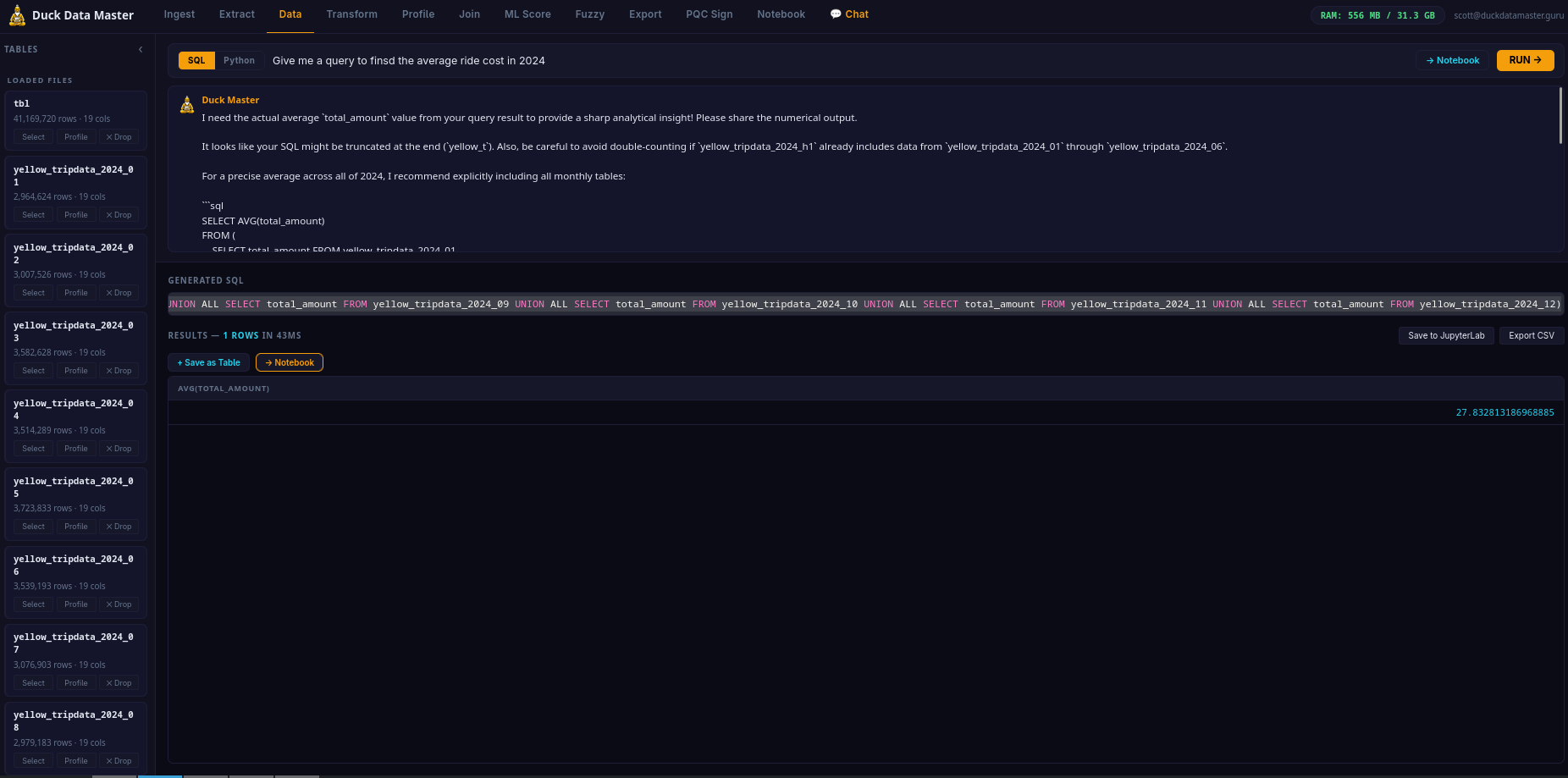
Two AI modes work together: the SQL bar generates and runs queries instantly, while Duck Master handles the back-and-forth — follow-up questions, data exploration, sanity-checks on results. It's like having a data analyst on call, inside the app.
Automated Data Engineering
AI-Powered ETL — Extract, Transform, Load
ETL is the process every data team runs before analysis can begin: take raw, messy data from the real world, clean and restructure it into something a query can actually use, then load it into the analytics engine. Traditionally this requires a data engineer, custom scripts, and hours of work. Duck Data Master does it automatically, in seconds, using AI.
EXTRACT
Drop any file — CSV, Excel, Parquet, JSON, Arrow, TSV. The engine reads it instantly, detects column types, delimiters, encodings, and headers automatically. No configuration required.
TRANSFORM
Duck Master profiles your data the moment it loads — spots dates stored as text, revenue columns with dollar signs, "Active" vs "active" vs "ACTIVE" in the same column, null values, duplicates. He tells you what's wrong and writes the SQL to fix it. You approve. Done.
LOAD
The cleaned, structured table is ready for queries — correct types, consistent values, no garbage. Run any SQL against it, join it with other tables, export as CSV / Parquet / JSON, or write back to S3/GCS/Azure with COPY TO. Your pipeline, end to end, on your instance.
What used to take a data engineer half a day takes Duck Master thirty seconds. The AI identifies the issues. You decide what to fix. The engine applies it. No code, no scripts, no pipeline to maintain.
Core Feature
AI Text-to-SQL
Ask your question in plain English. The AI generates a correct SQL query against your actual table schema — column names, types, and all. No guessing. No generic templates. The SQL runs immediately and you can edit it before or after. Powered by Google Gemini on GCP infrastructure.
Core Engine
Production-Grade SQL Analytics Engine
Not a toy query builder — a production-grade columnar analytics engine running natively on your cloud compute. PIVOT, window functions, CTEs, joins, aggregates, regex, time series, LIST and STRUCT types. Query billions of rows — right-size your instance to your workload and budget. No cluster management, no per-query billing, no shared tenancy.
Guru Cloud Instance
Deploy a Full Analytics Stack — Automated, GCP Native
Sign up and your dedicated GCP analytics instance provisions automatically — no cloud account, no setup, no DevOps required. The complete Duck Data Master stack is live in under 5 minutes. AI analytics dashboard with Duck Master built in, JupyterLab, Python NL mode, and Chat AI — all running on compute isolated exclusively to your account. Your data is never shared with other customers.
GCP NATIVE
Intel Sapphire Rapids C3 compute — 6 tiers from 4 vCPU to 176 vCPU. Native GCS bucket mounts, low-latency Gemini AI via VPC, and automated provisioning. Right-size your instance to your workload — scale up when you need it, scale down when you don't.
12-TAB ANALYTICS IDE + JUPYTER
A full 12-tab analytics IDE — Ingest (GCS file manager + file upload), Extract (spatial, Delta/Iceberg, direct cloud query), Query (NL-to-SQL results), Transform (SQL editor), Profile, Join Builder, ML Score, Fuzzy Match, Export (multi-format + write-back), PQC Sign (keypair lifecycle), Notebook (Jupyter shortcuts), and Chat AI. JupyterLab for custom pipelines. All run as systemd services on your GCP instance.
YOUR DATA, YOUR INSTANCE
Upload files, connect S3/GCS/Azure, or browse your dedicated GCS bucket. Your data goes directly into your dedicated analytics instance — never shared with other customers, never accessible to anyone else.
✓ Automated provisioning — no setup required
✓ TLS certificate auto-issued
✓ Duck Master AI active from minute one
Formats
Every File Format
CSV, TSV, Parquet, JSON, NDJSON, Excel (.xlsx), Apache Arrow IPC. Auto-detects schema, delimiter, encoding, and header row. Handles messy real-world exports — mixed types, missing values, inconsistent dates — without preprocessing.
Post-Quantum Security
ML-DSA-65 Signed Exports — NIST FIPS 204
Every Guru cloud instance ships with a post-quantum ML-DSA-65 signing keypair (NIST FIPS 204, Security Level 3). Sign any CSV, Parquet, or JSON export with one click — the dashboard produces a .sig file your clients can verify with your public key. No PKI, no certificate authority, no certificate chain.
TAMPER-EVIDENT
Signature covers SHA-256 of the file + filename + timestamp. Any modification to the output — even one byte — invalidates the signature. Proof of data integrity at the point of export.
POST-QUANTUM SECURE
ML-DSA-65 is NIST FIPS 204 — resistant to attacks from both classical and quantum computers. The same algorithm the US government standardized for long-lived digital signatures. Future-proof by default.
FULL KEYPAIR LIFECYCLE
Generate, rotate, back up to your GCS bucket, and restore keypairs — all from the PQC Sign tab. Your private key lives on your instance. Save a backup to your GCS bucket. Rotate on your schedule. No certificate authority, no expiry dates, no revocation infrastructure. Share the public key once. Verify forever.
No other analytics platform at this price point offers post-quantum signed exports. Databricks costs $5,000+/month and does not include this. Duck Data Master Guru includes it at no extra charge — because your data's integrity should be provable, not assumed.
Privacy
Your Data Stays on Your Dedicated Instance — Isolated by Architecture
Your dedicated instance is yours alone — no shared compute, no other customers on the same machine. Your data loads directly into your instance and never touches any other customer's environment.
When you ask a question in plain English or Python, only your question and your table schema (column names and types — never the actual data rows) are sent to our AI backend via Cloud Run. The SQL comes back, runs on your dedicated compute against your data, and results stay in your session.
Privacy is not a policy. It is a physical consequence of the architecture. One instance per customer. Your data and our other customers' data are never co-mingled. Audit-safe from day one.
Output
Export & Write Back to Cloud Storage
Download query results as CSV, Parquet, or JSON from the Export tab. Write any table or result directly back to your cloud storage (S3, GCS, Azure) with COPY TO — with optional partitioning by any column. Sign exports with ML-DSA-65 post-quantum signature for tamper-evident data delivery. Your pipeline, end to end, on your dedicated instance.
Advanced Analytics
ML Scoring · Fuzzy Match · Join Builder · Data Profiling
Train and score machine learning models directly on your loaded tables — Random Forest, Gradient Boosting, Regression — with feature importance charts and a scored output table. Fuzzy-match across datasets using Jaro-Winkler similarity — find "Acme Corp" and "ACME Corporation" in the same join without exact-match SQL. Build cross-table joins visually without writing SQL. Profile any column with SUMMARIZE — min, max, mean, std, percentiles, null % — in one click. This is a Databricks-class analytics environment at a fraction of the cost.
Cloud Storage
Connect Amazon S3, Google Cloud Storage & Azure Blob — Directly
Your data already lives in the cloud. Duck Data Master connects directly to your S3 buckets, GCS buckets, and Azure Blob containers — no downloads, no manual exports, no moving files. Enter your credentials, paste the path, and the file loads straight into the analytics engine on your cloud instance.
AMAZON S3
Access Key ID + Secret Access Key. Any region. Any bucket you have read access to. Supports CSV, Parquet, JSON, NDJSON, Arrow, Excel.
GOOGLE CLOUD STORAGE
Service account JSON. Any GCS bucket the account has read access to. Works with all supported file formats.
AZURE BLOB STORAGE
Storage account name + account key. Any container, any blob. Your data flows directly from Azure Blob to your GCP analytics instance — never through Duck Data Master infrastructure.
🔒 Credentials are used only to authenticate your instance against your bucket. Your data flows directly from your cloud storage to your cloud instance — it never passes through Duck Data Master infrastructure.
Ingest Tab
GCS Bucket File Manager — Browse, Upload, Organize
The Ingest tab is step one of every pipeline. Upload files by drag-and-drop, enter a local path, or browse your dedicated GCS bucket directly in the dashboard — no separate Cloud Console window required.
FOLDER NAVIGATION
Breadcrumb navigation — click any path segment to jump to it. Hit ../ to go up a level. Folders open inline. Full tree navigation without leaving the dashboard.
CREATE & DELETE
Create new folders inline. Delete individual files or entire folder trees with one click. Each file and folder row shows a 🗑 delete button — no confirmation modals slowing you down.
LOAD SELECTED FILES
Check any files in the browser and hit "Load Selected →" — they're pulled from GCS into the analytics engine instantly, ready to query. No manual path copy-paste required.
Extract Tab
Spatial Analytics · Delta Lake · Iceberg · Direct Cloud Query
The Extract tab goes beyond standard file formats — connect to open table formats, run geospatial queries, and read cloud data lakes directly without loading data into memory first.
SPATIAL — ST_ FUNCTIONS
Full geospatial extension — ST_Distance, ST_Contains, ST_Intersects, and 50+ spatial functions. Run geographic queries directly on your data. GeoJSON, WKT, and coordinate point support.
DELTA LAKE & ICEBERG
Read Delta Lake and Apache Iceberg tables from GCS or S3 directly — no Spark cluster, no Databricks, no ETL step. Point at your lakehouse path, query it like a table.
DIRECT CLOUD QUERY (httpfs)
Query Parquet, CSV, or JSON files on S3/GCS/Azure without downloading them first. The analytics engine streams what it needs — nothing lands permanently on disk. Ideal for large data lakes where you only need a subset.
Notebook Tab
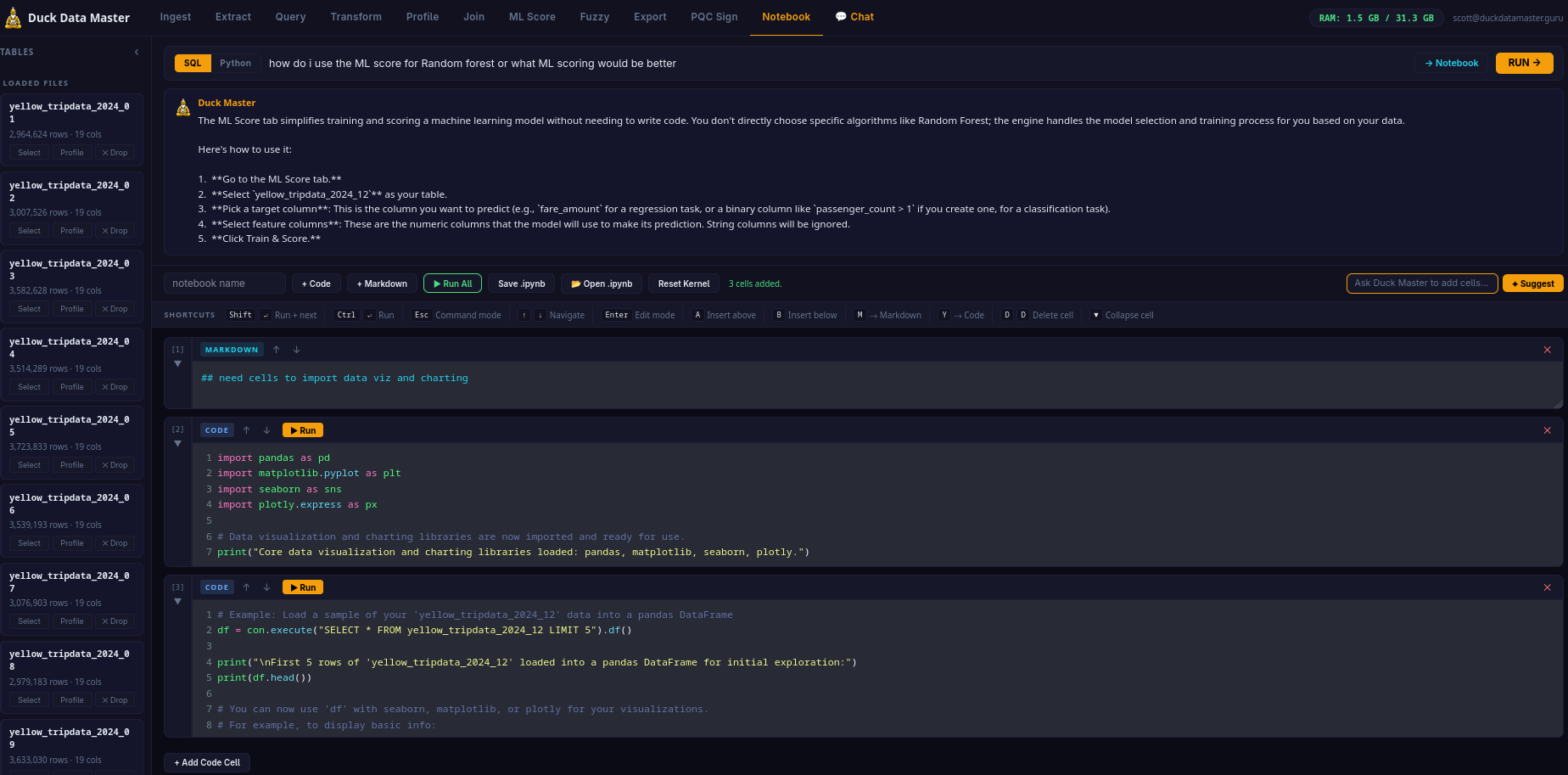
Built-in AI Notebook — Full Jupyter Keyboard Shortcuts
The Notebook tab is a full code + markdown cell environment — not a stripped-down REPL. If you know Jupyter or Colab, you're already at home. Every keyboard shortcut you depend on works exactly as expected.
KEYBOARD SHORTCUTS
Shift+↵ Run cell + advance · Ctrl+↵ Run in place
A Insert above · B Insert below
M → Markdown · Y → Code
D,D Delete cell · ↑↓ Navigate
Esc Command mode · Enter Edit mode
CELL FEATURES
Auto-growing cells — CodeMirror expands as you type. Collapsible cells — fold long outputs. Left gutter selector with cell number [N] and collapse toggle. Amber border = command mode. Green border = edit mode.
AI CELL ASSIST
✦ Suggest AI bar below the toolbar — describe what you want, Duck Master writes the cell. Inject results from the Query tab or Chat directly into a Notebook cell with "→ Notebook". Start clean or build from a working query.
Infrastructure
Elastic GCP — Full Stack
Built entirely on Google Cloud Platform. The AI text-to-SQL runs on Google AI (Gemini). Auth and data on Firebase. Backend on Cloud Run — scales to zero when idle, scales out automatically under load. No cluster to manage, no DevOps, no capacity planning. Enterprise-grade GCP infrastructure at $99/mo platform fee.